カレンダー
カレンダー表示の見た目を補うカスタマイズをまとめます。祝日表示には 2 つの方式があります。
| 方式 | 仕組み | 対応カレンダー | 向いている用途 |
|---|---|---|---|
| CSS 生成方式 | 日付を固定した CSS を拡張スタイルに置く(生成ツールあり) | 標準カレンダーのみ | 手軽に国民の祝日だけ出したい |
| 祝日マスタ方式 | 期限付きテーブルに祝日を登録し、拡張スクリプトで読み込んで表示 | 標準カレンダー・FullCalendar | 会社独自の休日も管理したい、毎年 CSS を作り直したくない |
祝日マスタ方式は、Google カレンダーの日本の祝日カレンダーから祝日マスタへ自動登録する仕組みと組み合わせられます。
標準カレンダーと FullCalendar
カレンダーには「標準」と「FullCalendar」の 2 種類があり、「テーブルの管理」の「カレンダー」タブの「カレンダータイプ」で切り替えます(SiteUtilities.cs#L16012-L16028)。1.5.8.1 では General.json の DefaultCalendarType が 2(FullCalendar)なので、カレンダータイプを設定していないサイトは FullCalendar で表示されます(General.json#L61、SiteSettings.cs#L410)。次の「今日」の強調と CSS 生成方式は標準カレンダーの HTML(#CalendarBody・.CalendarBody)に当てる CSS なので、FullCalendar では効きません。使うときはカレンダータイプを「標準」にしてください。
「今日」を強調表示する
標準カレンダーが対象です(FullCalendar では下の CSS は当たりません)。旧 UI のテーマではカレンダーの今日の日付に青枠が付いていましたが、新 UI では表示されません。今日のセルには today クラスが付いており、青枠の CSS も存在しますが、新 UI のスタイルで上書きされて無効になっています。
より優先度の高い CSS を用意すれば表示できます。!important を使う場合は次のとおりです。
.CalendarBody .today {
    border: solid 2px #00f !important;
}
!important を避けるなら box-shadow を使います。枠が内側に描かれるので、レイアウトへの影響も小さくなります。
.CalendarBody .today {
    box-shadow: inset 2px 2px 0 #00f, inset -2px -2px 0 #00f;
}拡張スタイルとして置けば全ページに適用されます。背景色を付けるなど、.CalendarBody .today に好みのスタイルを当てて強調できます。
土日・祝日を CSS で表示する(標準カレンダー)
INFO
この方法はプリザンターの標準カレンダーで使えます。FullCalendar には対応していません。FullCalendar でも表示したい場合は、後述の祝日マスタ方式を使ってください。
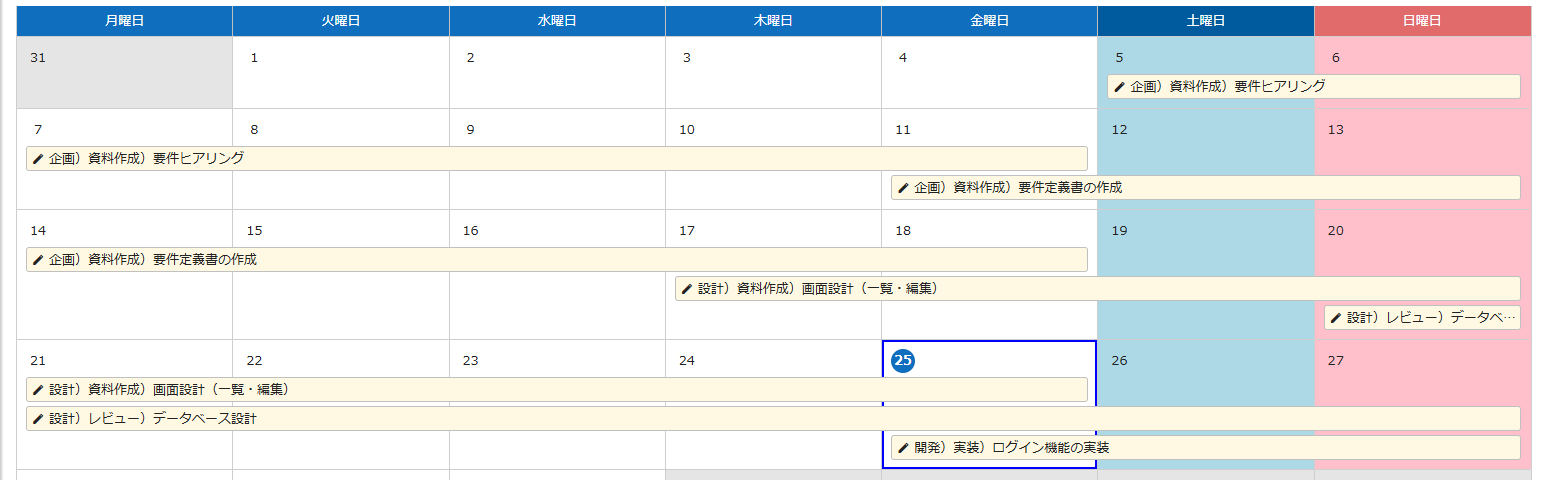
土日
表の 6 列目・7 列目の背景色を変えます。前月・翌月のグレーアウト部分には適用しないよう :not(.other-month) で除外しています。
列の位置で指定するのは、日付のセル(td)に曜日のクラスが無いためです。1.5.8.1 の標準カレンダーで日付のセルに付くクラスは container・today・other-month だけで、sunday・saturday などの曜日のクラスは見出しの th にしか付きません(HtmlCalendar.cs)。日付は data-id に yyyy/M/d の形で入ります。
#CalendarBody #Grid tbody tr td:nth-child(6):not(.other-month){background-color:#add8e6;}
#CalendarBody #Grid tbody tr td:nth-child(7):not(.other-month){background-color:#ffc0cb;}
General.json の FirstDayOfWeek を変更している環境(公式マニュアルでは変更不可のパラメータとされています)では曜日の列位置が変わるので、数字を調整してください。
祝日
日付のセルは data-id 属性に日付を yyyy/M/d 形式(月・日はゼロ埋めなし。例: 2024/1/1、2024/12/24)で持っているので(HtmlCalendar.cs#L522)、それで日付を指定し、背景色の変更と疑似要素によるラベル表示を行います。
#CalendarBody #Grid tbody tr td[data-id="2024/12/24"]:not(.other-month){background-color:#ffc0cb !important;}
#CalendarBody #Grid tbody tr td[data-id="2024/12/24"] div .day:after{content:"クリスマス";margin-left:5px;}
祝日の数だけこの 2 行を並べます。内閣府の祝日一覧を基にした 2024 年・2025 年分の例は次のとおりです。
CalendarStyle-Holiday2024.css
#CalendarBody #Grid tbody tr td[data-id="2024/1/1"]:not(.other-month){background-color:#ffc0cb !important;}
#CalendarBody #Grid tbody tr td[data-id="2024/1/1"] div .day:after{content:"元日";margin-left:5px;}
#CalendarBody #Grid tbody tr td[data-id="2024/1/8"]:not(.other-month){background-color:#ffc0cb !important;}
#CalendarBody #Grid tbody tr td[data-id="2024/1/8"] div .day:after{content:"成人の日";margin-left:5px;}
#CalendarBody #Grid tbody tr td[data-id="2024/2/11"]:not(.other-month){background-color:#ffc0cb !important;}
#CalendarBody #Grid tbody tr td[data-id="2024/2/11"] div .day:after{content:"建国記念の日";margin-left:5px;}
#CalendarBody #Grid tbody tr td[data-id="2024/2/12"]:not(.other-month){background-color:#ffc0cb !important;}
#CalendarBody #Grid tbody tr td[data-id="2024/2/12"] div .day:after{content:"休日";margin-left:5px;}
#CalendarBody #Grid tbody tr td[data-id="2024/2/23"]:not(.other-month){background-color:#ffc0cb !important;}
#CalendarBody #Grid tbody tr td[data-id="2024/2/23"] div .day:after{content:"天皇誕生日";margin-left:5px;}
#CalendarBody #Grid tbody tr td[data-id="2024/3/20"]:not(.other-month){background-color:#ffc0cb !important;}
#CalendarBody #Grid tbody tr td[data-id="2024/3/20"] div .day:after{content:"春分の日";margin-left:5px;}
#CalendarBody #Grid tbody tr td[data-id="2024/4/29"]:not(.other-month){background-color:#ffc0cb !important;}
#CalendarBody #Grid tbody tr td[data-id="2024/4/29"] div .day:after{content:"昭和の日";margin-left:5px;}
#CalendarBody #Grid tbody tr td[data-id="2024/5/3"]:not(.other-month){background-color:#ffc0cb !important;}
#CalendarBody #Grid tbody tr td[data-id="2024/5/3"] div .day:after{content:"憲法記念日";margin-left:5px;}
#CalendarBody #Grid tbody tr td[data-id="2024/5/4"]:not(.other-month){background-color:#ffc0cb !important;}
#CalendarBody #Grid tbody tr td[data-id="2024/5/4"] div .day:after{content:"みどりの日";margin-left:5px;}
#CalendarBody #Grid tbody tr td[data-id="2024/5/5"]:not(.other-month){background-color:#ffc0cb !important;}
#CalendarBody #Grid tbody tr td[data-id="2024/5/5"] div .day:after{content:"こどもの日";margin-left:5px;}
#CalendarBody #Grid tbody tr td[data-id="2024/5/6"]:not(.other-month){background-color:#ffc0cb !important;}
#CalendarBody #Grid tbody tr td[data-id="2024/5/6"] div .day:after{content:"休日";margin-left:5px;}
#CalendarBody #Grid tbody tr td[data-id="2024/7/15"]:not(.other-month){background-color:#ffc0cb !important;}
#CalendarBody #Grid tbody tr td[data-id="2024/7/15"] div .day:after{content:"海の日";margin-left:5px;}
#CalendarBody #Grid tbody tr td[data-id="2024/8/11"]:not(.other-month){background-color:#ffc0cb !important;}
#CalendarBody #Grid tbody tr td[data-id="2024/8/11"] div .day:after{content:"山の日";margin-left:5px;}
#CalendarBody #Grid tbody tr td[data-id="2024/8/12"]:not(.other-month){background-color:#ffc0cb !important;}
#CalendarBody #Grid tbody tr td[data-id="2024/8/12"] div .day:after{content:"休日";margin-left:5px;}
#CalendarBody #Grid tbody tr td[data-id="2024/9/16"]:not(.other-month){background-color:#ffc0cb !important;}
#CalendarBody #Grid tbody tr td[data-id="2024/9/16"] div .day:after{content:"敬老の日";margin-left:5px;}
#CalendarBody #Grid tbody tr td[data-id="2024/9/22"]:not(.other-month){background-color:#ffc0cb !important;}
#CalendarBody #Grid tbody tr td[data-id="2024/9/22"] div .day:after{content:"秋分の日";margin-left:5px;}
#CalendarBody #Grid tbody tr td[data-id="2024/9/23"]:not(.other-month){background-color:#ffc0cb !important;}
#CalendarBody #Grid tbody tr td[data-id="2024/9/23"] div .day:after{content:"休日";margin-left:5px;}
#CalendarBody #Grid tbody tr td[data-id="2024/10/14"]:not(.other-month){background-color:#ffc0cb !important;}
#CalendarBody #Grid tbody tr td[data-id="2024/10/14"] div .day:after{content:"スポーツの日";margin-left:5px;}
#CalendarBody #Grid tbody tr td[data-id="2024/11/3"]:not(.other-month){background-color:#ffc0cb !important;}
#CalendarBody #Grid tbody tr td[data-id="2024/11/3"] div .day:after{content:"文化の日";margin-left:5px;}
#CalendarBody #Grid tbody tr td[data-id="2024/11/4"]:not(.other-month){background-color:#ffc0cb !important;}
#CalendarBody #Grid tbody tr td[data-id="2024/11/4"] div .day:after{content:"休日";margin-left:5px;}
#CalendarBody #Grid tbody tr td[data-id="2024/11/23"]:not(.other-month){background-color:#ffc0cb !important;}
#CalendarBody #Grid tbody tr td[data-id="2024/11/23"] div .day:after{content:"勤労感謝の日";margin-left:5px;}
CalendarStyle-Holiday2025.css
#CalendarBody #Grid tbody tr td[data-id="2025/1/1"]:not(.other-month){background-color:#ffc0cb !important;}
#CalendarBody #Grid tbody tr td[data-id="2025/1/1"] div .day:after{content:"元日";margin-left:5px;}
#CalendarBody #Grid tbody tr td[data-id="2025/1/13"]:not(.other-month){background-color:#ffc0cb !important;}
#CalendarBody #Grid tbody tr td[data-id="2025/1/13"] div .day:after{content:"成人の日";margin-left:5px;}
#CalendarBody #Grid tbody tr td[data-id="2025/2/11"]:not(.other-month){background-color:#ffc0cb !important;}
#CalendarBody #Grid tbody tr td[data-id="2025/2/11"] div .day:after{content:"建国記念の日";margin-left:5px;}
#CalendarBody #Grid tbody tr td[data-id="2025/2/23"]:not(.other-month){background-color:#ffc0cb !important;}
#CalendarBody #Grid tbody tr td[data-id="2025/2/23"] div .day:after{content:"天皇誕生日";margin-left:5px;}
#CalendarBody #Grid tbody tr td[data-id="2025/2/24"]:not(.other-month){background-color:#ffc0cb !important;}
#CalendarBody #Grid tbody tr td[data-id="2025/2/24"] div .day:after{content:"休日";margin-left:5px;}
#CalendarBody #Grid tbody tr td[data-id="2025/3/20"]:not(.other-month){background-color:#ffc0cb !important;}
#CalendarBody #Grid tbody tr td[data-id="2025/3/20"] div .day:after{content:"春分の日";margin-left:5px;}
#CalendarBody #Grid tbody tr td[data-id="2025/4/29"]:not(.other-month){background-color:#ffc0cb !important;}
#CalendarBody #Grid tbody tr td[data-id="2025/4/29"] div .day:after{content:"昭和の日";margin-left:5px;}
#CalendarBody #Grid tbody tr td[data-id="2025/5/3"]:not(.other-month){background-color:#ffc0cb !important;}
#CalendarBody #Grid tbody tr td[data-id="2025/5/3"] div .day:after{content:"憲法記念日";margin-left:5px;}
#CalendarBody #Grid tbody tr td[data-id="2025/5/4"]:not(.other-month){background-color:#ffc0cb !important;}
#CalendarBody #Grid tbody tr td[data-id="2025/5/4"] div .day:after{content:"みどりの日";margin-left:5px;}
#CalendarBody #Grid tbody tr td[data-id="2025/5/5"]:not(.other-month){background-color:#ffc0cb !important;}
#CalendarBody #Grid tbody tr td[data-id="2025/5/5"] div .day:after{content:"こどもの日";margin-left:5px;}
#CalendarBody #Grid tbody tr td[data-id="2025/5/6"]:not(.other-month){background-color:#ffc0cb !important;}
#CalendarBody #Grid tbody tr td[data-id="2025/5/6"] div .day:after{content:"休日";margin-left:5px;}
#CalendarBody #Grid tbody tr td[data-id="2025/7/21"]:not(.other-month){background-color:#ffc0cb !important;}
#CalendarBody #Grid tbody tr td[data-id="2025/7/21"] div .day:after{content:"海の日";margin-left:5px;}
#CalendarBody #Grid tbody tr td[data-id="2025/8/11"]:not(.other-month){background-color:#ffc0cb !important;}
#CalendarBody #Grid tbody tr td[data-id="2025/8/11"] div .day:after{content:"山の日";margin-left:5px;}
#CalendarBody #Grid tbody tr td[data-id="2025/9/15"]:not(.other-month){background-color:#ffc0cb !important;}
#CalendarBody #Grid tbody tr td[data-id="2025/9/15"] div .day:after{content:"敬老の日";margin-left:5px;}
#CalendarBody #Grid tbody tr td[data-id="2025/9/23"]:not(.other-month){background-color:#ffc0cb !important;}
#CalendarBody #Grid tbody tr td[data-id="2025/9/23"] div .day:after{content:"秋分の日";margin-left:5px;}
#CalendarBody #Grid tbody tr td[data-id="2025/10/13"]:not(.other-month){background-color:#ffc0cb !important;}
#CalendarBody #Grid tbody tr td[data-id="2025/10/13"] div .day:after{content:"スポーツの日";margin-left:5px;}
#CalendarBody #Grid tbody tr td[data-id="2025/11/3"]:not(.other-month){background-color:#ffc0cb !important;}
#CalendarBody #Grid tbody tr td[data-id="2025/11/3"] div .day:after{content:"文化の日";margin-left:5px;}
#CalendarBody #Grid tbody tr td[data-id="2025/11/23"]:not(.other-month){background-color:#ffc0cb !important;}
#CalendarBody #Grid tbody tr td[data-id="2025/11/23"] div .day:after{content:"勤労感謝の日";margin-left:5px;}
#CalendarBody #Grid tbody tr td[data-id="2025/11/24"]:not(.other-month){background-color:#ffc0cb !important;}
#CalendarBody #Grid tbody tr td[data-id="2025/11/24"] div .day:after{content:"休日";margin-left:5px;}
CSS を自動生成するツール
内閣府の祝日 CSV から上記の CSS を生成し、拡張スタイルとして全サイトに適用するツール pleasanter-calendar-holiday-style-generator があります(リポジトリは移転しており、こちらが現在の場所です)。
- 1.4 系以降のプリザンターがインストールされている環境が前提です。それ以前のバージョンでも .NET 8 Runtime を追加すれば使えます。
- 実行時に内閣府のサイトからファイルを取得するため、オフライン環境では実行できません。
使い方(Windows の場合):
リリースから zip を取得・解凍し、
Implem.Pleasanterと同じ階層にHolidayStyleGeneratorフォルダとして配置します。コマンドプロンプトで実行します。
shellcd C:\pleasanter\HolidayStyleGenerator dotnet VehicleVision.PleasanterTools.HolidayStyleGenerator.dllImplem.Pleasanter\App_Data\Parameters\ExtendedStyles\CalendarStyleに CSS ファイル群が生成されていれば完了です。必要に応じてプリザンターのプロセスを再起動してください。
- ジェネレータは相対パスで
Implem.Pleasanterを探します。同じ階層にない場合は、Implem.CodeDefinerと同様に/pオプションでプリザンター本体のパスを指定します。 - Azure の場合は、site フォルダに zip を解凍せずアップロードすると
HolidayStyleGeneratorフォルダに展開されるので、そこでdotnet VehicleVision.PleasanterTools.HolidayStyleGenerator.dll /p C:\home\site\wwwrootを実行します。
祝日マスタで独自の祝日を表示する
期限付きテーブルを「祝日マスタ」として使い、そのレコードを拡張スクリプトで読み込んで標準カレンダーと FullCalendar の両方に表示します。本体の改修は不要で、拡張スクリプトと拡張スタイルだけで実装します。
図を読み込み中…
- 祝日マスタは、カレンダーを表示しているユーザーのログインセッションで読み込みます。API キーは不要ですが、ユーザーには祝日マスタサイトの閲覧権限が必要です。
- 会社独自の休日もレコードを追加するだけで表示できます。
祝日マスタを作る
期限付きテーブルを 1 つ作り、祝日 1 日につき 1 レコード登録します。作成後にサイト ID を控えておきます。
| 項目 | 用途 | 設定例 |
|---|---|---|
| タイトル | 表示する祝日名 | 元日 |
| 開始 | 祝日の日付(書式を「日付」にしておくと運用しやすい) | 2027/1/1 |
拡張スタイル
土曜・日曜・祝日の表示をまとめています。
/* 標準カレンダー。週の開始曜日が月曜日の場合 */
[id^="CalendarBody"] #Grid tbody tr > td:nth-last-child(2):not(.other-month) {
  background-color: #e8f3ff;
}

[id^="CalendarBody"] #Grid tbody tr > td:last-child:not(.other-month) {
  background-color: #fff0f3;
}

/* FullCalendar */
[id^="FullCalendar"].calendar-container .fc-day-sat:not(.fc-day-other) {
  background-color: #e8f3ff;
}

[id^="FullCalendar"].calendar-container .fc-day-sun:not(.fc-day-other) {
  background-color: #fff0f3;
}

/* 祝日は土日の色より優先する */
.pch-holiday {
  background-color: #ffc0cb !important;
}

.pch-holiday-label {
  color: #b00020;
  font-size: 0.85em;
  font-weight: 600;
  margin-left: 0.5em;
  white-space: nowrap;
}

/* 標準カレンダーの週表示 */
[id^="CalendarBody"] td.is-weekly.pch-holiday {
  position: relative;
}

[id^="CalendarBody"] td.is-weekly > .pch-holiday-label {
  position: absolute;
  right: 0.4em;
  top: 0.25em;
}標準カレンダーの土日は列位置で判定しているため、General.json の FirstDayOfWeek を変えている環境ではセレクタを調整してください。FullCalendar はライブラリが付ける .fc-day-sat / .fc-day-sun を使うので列位置に依存しません。
拡張スクリプト
HOLIDAY_SITE_ID を祝日マスタのサイト ID に変えます。既定項目以外を使う場合は DATE_COLUMN と TITLE_COLUMN も変えてください。
(function () {
  'use strict';

  // ===== 環境に合わせて変更する設定 =====
  var HOLIDAY_SITE_ID = 123456;
  var DATE_COLUMN = 'StartTime';
  var TITLE_COLUMN = 'Title';
  var PAGE_SIZE = 200;

  var holidayMap = Object.create(null);
  var loaded = false;
  var loading = false;
  var callbacks = [];
  var renderTimer = null;

  function toDateKey(value) {
    // Dateへ変換せず、タイムゾーンによる日付ずれを避ける
    var match = String(value || '').match(/^(\d{4})[-/](\d{1,2})[-/](\d{1,2})/);
    if (!match) return null;
    return match[1] + '-' + String(match[2]).padStart(2, '0')
      + '-' + String(match[3]).padStart(2, '0');
  }

  function finishLoad(error, records) {
    loading = false;
    if (!error) {
      holidayMap = Object.create(null);
      records.forEach(function (record) {
        var key = toDateKey(record[DATE_COLUMN]);
        if (!key) return;

        var name = String(record[TITLE_COLUMN] || '休日');
        holidayMap[key] = holidayMap[key]
          ? holidayMap[key] + ' / ' + name
          : name;
      });
      loaded = true;
    } else {
      console.warn('祝日マスタを取得できませんでした。', error);
    }

    var waiting = callbacks.slice();
    callbacks.length = 0;
    waiting.forEach(function (callback) {
      callback(!error);
    });
  }

  function fetchPage(offset, records) {
    $p.apiGet({
      id: HOLIDAY_SITE_ID,
      data: {
        ApiVersion: 1.1,
        Offset: offset,
        PageSize: PAGE_SIZE
      },
      done: function (response) {
        var result = response && response.Response;
        var page = result && Array.isArray(result.Data) ? result.Data : [];
        Array.prototype.push.apply(records, page);

        var totalCount = Number(result && result.TotalCount) || records.length;
        if (page.length > 0 && records.length < totalCount) {
          fetchPage(offset + page.length, records);
        } else {
          finishLoad(null, records);
        }
      },
      fail: function (xhr) {
        finishLoad(xhr || new Error('API request failed'), records);
      }
    });
  }

  function loadHolidays(callback) {
    if (loaded) {
      callback(true);
      return;
    }
    callbacks.push(callback);
    if (loading) return;
    loading = true;
    fetchPage(0, []);
  }

  function appendLabel($target, name) {
    if (!$target.length || $target.children('.pch-holiday-label').length) return;
    $('<span>', {
      'class': 'pch-holiday-label',
      text: name
    }).appendTo($target);
  }

  function decorateStandardCalendar() {
    $('[id^="CalendarBody"] #Grid td[data-id]').each(function () {
      var $cell = $(this);
      var key = toDateKey($cell.attr('data-id'));
      var name = key && holidayMap[key];
      if (!name) return;

      $cell.addClass('pch-holiday').attr('data-holiday-name', name);
      var $day = $cell.find('.day').first();
      appendLabel($day.length ? $day : $cell, name);
    });
  }

  function decorateFullCalendar() {
    $('[id^="FullCalendar"].calendar-container [data-date]').each(function () {
      var $element = $(this);
      var key = toDateKey($element.attr('data-date'));
      var name = key && holidayMap[key];
      if (!name) return;

      $element.addClass('pch-holiday').attr('data-holiday-name', name);

      if ($element.hasClass('fc-daygrid-day')) {
        appendLabel($element.find('.fc-daygrid-day-top').first(), name);
      } else if ($element.hasClass('fc-col-header-cell')) {
        appendLabel($element.find('.fc-col-header-cell-cushion').first(), name);
      } else if ($element.hasClass('fc-list-day')) {
        appendLabel($element.find('.fc-list-day-text').first(), name);
      }
    });
  }

  function decorateCalendars() {
    decorateStandardCalendar();
    decorateFullCalendar();
  }

  function scheduleDecoration() {
    clearTimeout(renderTimer);
    renderTimer = setTimeout(function () {
      loadHolidays(function (success) {
        if (success) decorateCalendars();
      });
    }, 50);
  }

  // 標準カレンダーのAjax更新とFullCalendarの初期描画に対応
  var previousCalendarLoad = $p.events.on_calendar_load;
  $p.events.on_calendar_load = function () {
    if (typeof previousCalendarLoad === 'function') {
      previousCalendarLoad.apply(this, arguments);
    }
    scheduleDecoration();
  };

  // FullCalendar内の前後移動などによるDOM再描画にも対応
  $(function () {
    scheduleDecoration();
    var mainForm = document.getElementById('MainForm');
    if (!mainForm || !window.MutationObserver) return;

    var observer = new MutationObserver(function (mutations) {
      var calendarChanged = mutations.some(function (mutation) {
        var target = mutation.target;
        return target.nodeType === 1
          && $(target).closest(
            '[id^="CalendarBody"], [id^="FullCalendar"]'
          ).length > 0;
      });
      if (calendarChanged) scheduleDecoration();
    });
    observer.observe(mainForm, { childList: true, subtree: true });
  });
})();
スクリプトのポイント
- 別サイトをログインセッションで取得:
$p.apiGetに祝日マスタのサイト ID を渡します。ブラウザのセッションで API が呼ばれるので、API キーをスクリプトに埋め込む必要はありません。OffsetとPageSizeで全ページを取得し、結果は画面内にキャッシュするので、FullCalendar を前後移動するたびに API を呼ぶことはありません。 - 日付は文字列のまま扱う:
Dateに変換すると値やブラウザのタイムゾーンによって前日にずれる可能性があるため、年月日部分を取り出してYYYY-MM-DDにそろえます。 - 両カレンダーに共通の判定: 標準カレンダーは
data-id="YYYY/M/D"、FullCalendar はdata-date="YYYY-MM-DD"を持つ要素を探し、同じholidayMapと.pch-holidayクラスで装飾します。同じ日に複数のレコードがあれば名称を「/」で連結します。 - 再描画への追従: FullCalendar の前後移動はプリザンターへの再リクエストなしにライブラリ内で DOM が描き直されるため、
$p.events.on_calendar_loadに加えてMutationObserverでも再描画を検出します。既存のon_calendar_loadがあれば呼び出してから処理します。
対応する表示
| カレンダー | 対応する表示 |
|---|---|
| 標準カレンダー | 月、週(年表示は 1 セルが 1 か月なので対象外) |
| FullCalendar | 月、週、日、リスト |
Google カレンダーの祝日を祝日マスタへ自動登録する
祝日マスタへ国民の祝日を毎年手入力する代わりに、Google カレンダーが公開している日本の祝日カレンダーをバックグラウンドサーバスクリプトで定期取得し、items.Upsert で登録します。本体の改修は不要です。
公開 iCal を使う
日本の祝日カレンダーのカレンダー ID は次のとおりです。
ja.japanese.official#holiday@group.v.calendar.google.com公開 iCal の URL は https://calendar.google.com/calendar/ical/{エンコードしたカレンダーID}/public/basic.ics の形式です。ID に # や @ を含むので、encodeURIComponent でエンコードして組み込みます(JavaScript の文字列に書くとき @ の前にバックスラッシュは不要です)。公開 iCal なので、Google Cloud プロジェクト・API キー・OAuth クライアントは不要で、取得は読み取り専用です。
WARNING
この方法で取得できるのは公開カレンダーだけです。非公開カレンダーを取り込むには、Google Calendar API と OAuth 認証、または漏えいしないよう管理した「非公開 iCal 形式のアドレス」が必要です。
祝日マスタに項目を追加する
前節の祝日マスタに、同期管理用の項目を追加します。
| 項目 | 用途 | 設定例 |
|---|---|---|
| タイトル | 祝日名 | 元日 |
| 開始 | 祝日の日付 | 2027/1/1 |
| 完了 | 祝日の終了 | 2027/1/1 23:59 |
| 分類A | 同期キー(items.Upsert のキー) | カレンダー ID と UID を連結した値 |
| 分類B | 取得元カレンダー ID | ja.japanese...google.com |
| 分類C | 取得方式 | google-ical |
分類 A をキーにすることで、同じイベントを再取得してもレコードは増えず、既存レコードが更新されます。
バックグラウンドサーバスクリプトを有効にする
バックグラウンドサーバスクリプトは既定で無効("BackgroundServerScript": false。Script.json#L3)なので、App_Data/Parameters/Script.json の次のキーを確認します(パラメータ設定であり本体の改修ではありません)。下の例は関係するキーだけの抜粋で、他のキーは既存のまま残します。変更後はプリザンターの再起動またはパラメータの再読み込みが必要です。
{
  "ServerScript": true,
  "BackgroundServerScript": true,
  "DisableServerScriptHttpClient": false
}
取込スクリプト
TARGET_SITE_ID を祝日マスタのサイト ID に変えます。
(function () {
  'use strict';

  // ===== 環境に合わせて変更する設定 =====
  var TARGET_SITE_ID = 123456;
  var CALENDAR_ID =
    'ja.japanese.official#holiday@group.v.calendar.google.com';
  var PAST_YEARS = 1;
  var FUTURE_YEARS = 2;

  function getProperty(block, name) {
    var pattern = new RegExp(
      '^' + name + '(?:;[^:]*)?:(.*)$',
      'mi'
    );
    var match = pattern.exec(block);
    return match ? match[1].replace(/\r$/, '') : '';
  }

  function decodeText(value) {
    return String(value || '').replace(/\\([nN,;\\])/g, function (_, char) {
      return char.toLowerCase() === 'n' ? '\n' : char;
    });
  }

  function toDateKey(value) {
    // 日本の祝日カレンダーは終日イベントなので先頭8桁を使用する
    var match = String(value || '').match(/^(\d{4})(\d{2})(\d{2})/);
    if (!match) return null;
    return match[1] + '-' + match[2] + '-' + match[3];
  }

  function inTargetYears(dateKey) {
    var currentYear = new Date().getFullYear();
    var year = Number(dateKey.substring(0, 4));
    return year >= currentYear - PAST_YEARS
      && year <= currentYear + FUTURE_YEARS;
  }

  function parseEvents(ics) {
    // RFC 5545の折り返し行を、プロパティ解析前に連結する
    var unfolded = String(ics || '')
      .replace(/\r\n[ \t]/g, '')
      .replace(/\n[ \t]/g, '');
    var pattern = /BEGIN:VEVENT\r?\n([\s\S]*?)END:VEVENT/g;
    var events = [];
    var match;

    while ((match = pattern.exec(unfolded)) !== null) {
      var block = match[1];
      var status = getProperty(block, 'STATUS').toUpperCase();
      var start = toDateKey(getProperty(block, 'DTSTART'));
      if (!start || status === 'CANCELLED' || !inTargetYears(start)) continue;

      events.push({
        uid: getProperty(block, 'UID'),
        title: decodeText(getProperty(block, 'SUMMARY')) || '休日',
        date: start
      });
    }
    return events;
  }

  function importEvent(event) {
    // カレンダーIDも含め、複数カレンダー間のUID衝突を避ける
    var sourceKey = CALENDAR_ID + '|' + (event.uid || event.date);
    var data = {
      Keys: ['ClassA'],
      Title: event.title,
      StartTime: event.date + 'T00:00:00',
      CompletionTime: event.date + 'T23:59:59',
      ClassA: sourceKey,
      ClassB: CALENDAR_ID,
      ClassC: 'google-ical'
    };

    // 祝日マスタ側の保護スクリプトへ、正規の同期処理であることを伝える
    context.UserData.holidayImportCalendarId = CALENDAR_ID;
    try {
      return items.Upsert(TARGET_SITE_ID, JSON.stringify(data));
    } finally {
      context.UserData.holidayImportCalendarId = null;
    }
  }

  function main() {
    var feedUrl = 'https://calendar.google.com/calendar/ical/'
      + encodeURIComponent(CALENDAR_ID)
      + '/public/basic.ics';

    httpClient.ResponseHeaders.Clear();
    httpClient.RequestUri = feedUrl;
    var ics = httpClient.Get();

    if (!httpClient.IsSuccess) {
      context.Log(
        '祝日カレンダーを取得できませんでした。status=' + httpClient.StatusCode
      );
      return;
    }

    var events = parseEvents(ics);
    var succeeded = 0;
    var failed = 0;

    for (var i = 0; i < events.length; i++) {
      try {
        if (importEvent(events[i])) {
          succeeded++;
        } else {
          failed++;
        }
      } catch (e) {
        failed++;
        context.Log(
          '祝日の登録に失敗しました。date=' + events[i].date
          + ', message=' + e.message
        );
      }
    }

    context.Log(
      '祝日取込が完了しました。対象=' + events.length
      + ', 成功=' + succeeded
      + ', 失敗=' + failed
    );
  }

  main();
})();- 折り返し行の連結: iCal では長いプロパティが次の行に折り返され、継続行は空白またはタブで始まります。
parseEventsの先頭で改行と先頭空白を除いてからVEVENTを解析します。 - 対象期間: 公開 iCal には過去のイベントも含まれる可能性があるため、現在年の 1 年前〜2 年後に限定しています(
PAST_YEARS/FUTURE_YEARSで変更)。 - Upsert のキー: カレンダー ID と UID を連結して分類 A に入れ、
Keys: ['ClassA']のitems.Upsertで初回は作成、2 回目以降は更新になります。プリザンターの API キーは不要で、バックグラウンドサーバスクリプトの実行ユーザーの権限が適用されます。 - 削除は同期しない: Google 側で削除されたイベントを自動削除する処理は、誤削除を避けるため含めていません。不要になった祝日は祝日マスタ側で確認して削除してください。
スクリプトを登録する
テナント管理のバックグラウンドサーバスクリプトに登録します。最初はスケジュールを待たず「今すぐ実行」で確認し、実行ログに対象件数・成功件数・失敗件数が記録されることを確かめます。
| 設定 | 内容 |
|---|---|
| 実行ユーザー | 祝日マスタを作成・更新できるユーザー |
| スケジュール | 1 日 1 回、または 1 週間に 1 回 |
| タイムアウト | 取得年数と環境に合わせて設定 |
| 無効 | オフ |
Google 由来のレコードを読み取り専用にする
items.Upsert だけでは、取り込んだレコードを利用者が手動で編集でき、次回同期で Google 側の値に戻ってしまいます。そこで、分類 C が google-ical のレコードは画面からの編集を禁止し、分類 C が空欄のレコード(手動登録)は編集可能とします。画面の読み取り専用化(操作ミスを防ぐ UI 対策)と、作成前・更新前・削除前のサーバー側での拒否(一覧編集や API 経由の更新も防ぐ対策)の両方を設定します。
祝日マスタサイトに、条件「レコード読み込み時」「作成前」「更新前」「削除前」でサーバスクリプトを登録します。
(function () {
  'use strict';

  var SOURCE_TYPE = 'google-ical';

  function fieldValue(target, name) {
    if (!target || target[name] == null) return '';
    return String(target[name]);
  }

  var oldRecord = typeof saved !== 'undefined' ? saved : null;
  var sourceType = fieldValue(oldRecord, 'ClassC')
    || fieldValue(model, 'ClassC');
  if (sourceType !== SOURCE_TYPE) return;

  var calendarId = fieldValue(oldRecord, 'ClassB')
    || fieldValue(model, 'ClassB');
  var importCalendarId = context.UserData
    ? String(context.UserData.holidayImportCalendarId || '')
    : '';
  var isImporter = importCalendarId !== ''
    && importCalendarId === calendarId;

  if (context.Condition === 'WhenloadingRecord') {
    columns.Title.ReadOnly = true;
    columns.StartTime.ReadOnly = true;
    columns.CompletionTime.ReadOnly = true;
    columns.ClassA.ReadOnly = true;
    columns.ClassB.ReadOnly = true;
    columns.ClassC.ReadOnly = true;
    return;
  }

  if (
    context.Condition === 'BeforeCreate'
    || context.Condition === 'BeforeUpdate'
    || context.Condition === 'BeforeDelete'
  ) {
    if (!isImporter) {
      context.Error(
        'Googleカレンダーから取り込んだ祝日は編集・削除できません。'
      );
    }
  }
})();
取込スクリプトは items.Upsert の直前に context.UserData.holidayImportCalendarId へカレンダー ID を設定しています。context.UserData は同一リクエスト内のサーバスクリプト間で共有されるため、保護スクリプトは正規の同期処理だけを通せます。実行ユーザー ID で例外にすると、そのユーザーが画面や API から変更した場合も許可されてしまいますが、この方法ならユーザーではなく処理経路で判定できます。
会社独自の休日と独自カレンダー
- 会社創立記念日などを手動登録するときは、分類 A〜C を空欄にします。同期キーも取得元も異なるため、次回同期で上書きされません。同じ日に Google の祝日と会社休日があれば、表示スクリプトが名称を連結して表示します。
- 会社独自の休日カレンダーが Google カレンダーで公開されていれば、
CALENDAR_IDをそのカレンダー ID に変えるだけで同じ仕組みを使えます。複数の公開カレンダーを取り込むときはカレンダー ID の配列をループします(同期キーにカレンダー ID を含めているので UID が衝突しません)。公開 iCal アドレスは公開設定されたカレンダーでのみ利用できます。